← All AP® study guides
AP® Study Guide Printable PDF · 36 pages

TransferCredit.org Guide to AP® Cybersecurity

AP® Cybersecurity study guide: a printable PDF built from the College Board's official course and exam description, in the official order.

  • 235 key terms, each with an example
  • 39 practice questions with every answer explained
  • A 2-page cram sheet for the night before
  • 2-, 4- and 8-week study plans built from the exam weights
Not sure yet? Try 10 free questions

Last updated 2026 · exam details checked against the College Board's published exam information in 2026

Look inside the guide

Real pages from the 36-page PDF.

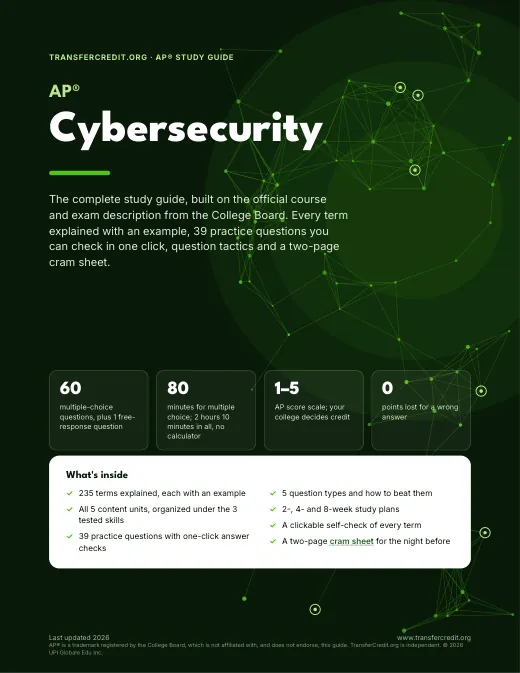
Page 1 of the TransferCredit.org Guide to AP® Cybersecurity: the cover
Page 1 The cover
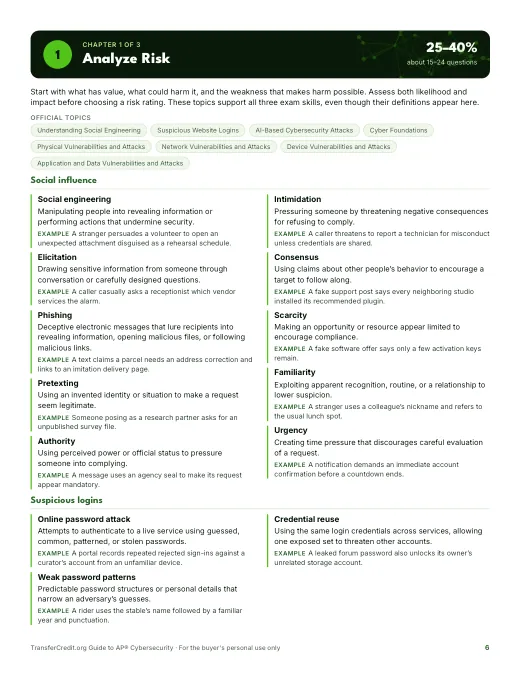
Page 6 of the TransferCredit.org Guide to AP® Cybersecurity: the Chapter 1 opener
Page 6 The Chapter 1 opener
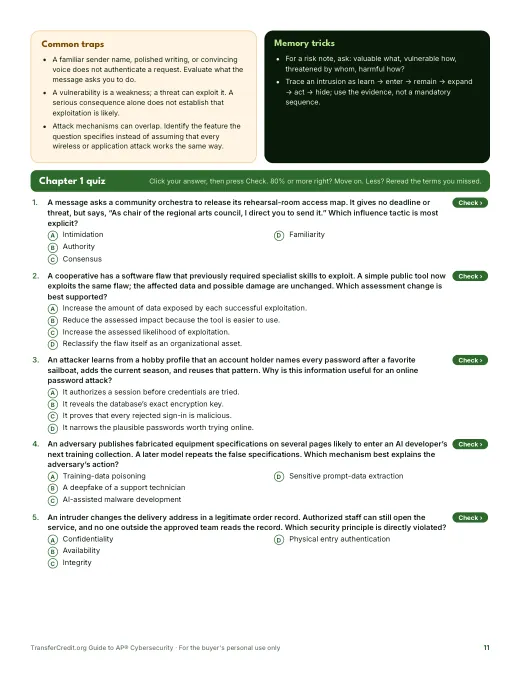
Page 11 of the TransferCredit.org Guide to AP® Cybersecurity: a chapter quiz
Page 11 A chapter quiz
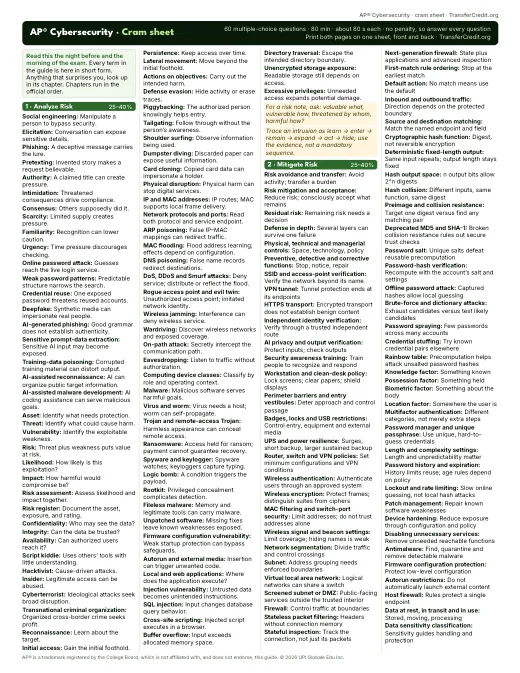
Page 35 of the TransferCredit.org Guide to AP® Cybersecurity: the 2-page cram sheet
Page 35 The 2-page cram sheet

What you get for $5

One chapter for each area of the official course and exam description, in the official order.

  • 📘36pages, printable
  • 🧭3chapters
  • 🔑235terms with examples
  • ✍️39practice questions, answers explained
  • ⚠️9exam traps to avoid
  • 📄2page cram sheet

Try 10 free AP® Cybersecurity questions

Multiple-choice questions taken from the guide's chapter quizzes: 3 areas, heaviest first. About 15 minutes, with every answer explained and a score by area. The exam's free-response questions aren't in this quiz: see how the exam works.

10 questions  
  1. Question 1 · Analyze Risk
    A message asks a community orchestra to release its rehearsal-room access map. It gives no deadline or threat, but says, “As chair of the regional arts council, I direct you to send it.” Which influence tactic is most explicit?
    Show the answer

    Answer: C. Authority. The claimed council position is used as a reason to obey. The message does not claim that peers complied or threaten a consequence.

    The trap: Intimidation would involve a threatened negative consequence; the stated message relies on a title.

  2. Question 2 · Mitigate Risk
    A planetarium can reduce projector theft with a cabinet lock, but the lock cannot eliminate theft. Management installs the lock and schedules a new assessment of the remaining exposure. What should that assessment evaluate?
    Show the answer

    Answer: D. Residual risk after mitigation. The lock is a mitigation. Exposure that remains afterward is residual risk, which management must evaluate rather than assume acceptable.

    The trap: Risk transfer to the cabinet manufacturer would require shifting a burden under an actual arrangement; installing a lock does not do that.

  3. Question 3 · Detect Attacks
    An AI tool proposes ignoring alerts from every program with a familiar filename. The organization has not tested the rule. Which step best addresses the risk before implementation?
    Show the answer

    Answer: B. Have a detection engineer validate the rule against relevant benign and malicious cases.. Expert validation can reveal both missed attacks and unnecessary alerts before the rule affects monitoring. A filename alone does not establish legitimacy.

    The trap: Approve the rule because of a familiar filename assumes a name proves the program is trustworthy; malicious files can use familiar names.

  4. Question 4 · Analyze Risk
    A cooperative has a software flaw that previously required specialist skills to exploit. A simple public tool now exploits the same flaw; the affected data and possible damage are unchanged. Which assessment change is best supported?
    Show the answer

    Answer: A. Increase the assessed likelihood of exploitation.. A ready-made tool lowers the skill needed and increases the set of potential adversaries. Nothing in the scenario changes the consequence of a successful attack.

    The trap: Increase the amount of data exposed is unsupported: the affected data and possible damage have not changed.

  5. Question 5 · Mitigate Risk
    On an intercity bus, a passenger uses a verified VPN service and separately validated HTTPS to a ticket website. The VPN operator terminates the VPN tunnel but has no TLS decryption capability or endpoint access. Which information remains protected from that operator?
    Show the answer

    Answer: A. The HTTPS message contents. The VPN operator can remove the tunnel’s encryption, but the independent HTTPS encryption remains between the browser and the website’s TLS endpoint.

    The trap: The timing of packets passing through the VPN endpoint remains visible as metadata; encryption does not hide every connection characteristic.

  6. Question 6 · Detect Attacks
    Original simulated entry records use one synchronized clock. A door opens at 21:12:05 and closes at 21:12:32; ordinary openings last 4–8 seconds. One badge event is recorded. Which next step best checks whether an unauthorized person entered?
    Show the answer

    Answer: C. Review recorded camera coverage at that entrance and time.. The 27-second opening is unusual and warrants checking visual evidence. Neither its duration nor a single badge event establishes the number or authorization of entrants.

    The trap: Declare that exactly two people entered invents a count that the door sensor and badge record do not provide.

  7. Question 7 · Analyze Risk
    An attacker learns from a hobby profile that an account holder names every password after a favorite sailboat, adds the current season, and reuses that pattern. Why is this information useful for an online password attack?
    Show the answer

    Answer: D. It narrows the plausible passwords worth trying online.. Personal details and predictable structure help build likely guesses. The attacker still has to try credentials; the information does not itself grant access.

    The trap: It authorizes a session confuses useful guessing information with successful authentication.

  8. Question 8 · Mitigate Risk
    A fabrication studio must support individual staff accounts, protect wireless frames with strong encryption and reduce radio coverage beyond its leased room. Which proposed configuration addresses all three requirements?
    Show the answer

    Answer: B. Approved-server EAP authentication, WPA3 protection and adjusted antenna direction and power. EAP can authenticate individual staff through an approved server; strong WPA3 protection encrypts frames, and antenna adjustments reduce unnecessary coverage.

    The trap: One shared staff password, WPA3 and adjusted antenna direction and power protects frames and controls coverage, but a shared credential does not provide individual staff accounts.

  9. Question 9 · Detect Attacks
    A simulated research network has a verified clean baseline and highly consistent traffic. Defenders are concerned about unfamiliar attacks without known signatures, and their stated budget cannot support hybrid monitoring. Which approach best fits these constraints?
    Show the answer

    Answer: A. Anomaly-based detection. Anomaly detection can flag deviations from the clean, consistent baseline without requiring a signature for that particular attack. It still needs tuning and investigation.

    The trap: A combined signature-and-anomaly system is hybrid monitoring, which the stated budget cannot support.

  10. Question 10 · Analyze Risk
    An adversary publishes fabricated equipment specifications on several pages likely to enter an AI developer’s next training collection. A later model repeats the false specifications. Which mechanism best explains the adversary’s action?
    Show the answer

    Answer: D. Training-data poisoning. The adversary contaminates material intended for model training so the resulting model repeats misinformation.

    The trap: Sensitive prompt-data extraction tries to obtain protected information from an AI system; it does not describe corrupting the training material.

The AP® Cybersecurity exam at a glance

The AP® Cybersecurity exam is from the College Board. It has 60 multiple-choice questions, plus 1 free-response question. You get 80 minutes for multiple choice; 2 hours 10 minutes in all, no calculator. The score scale is 1–5 (AP® score scale; your college decides credit). The guide has 3 chapters, one for each area of the official course and exam description; its 3 units carry the same weight (25–40% each).

Questions
60multiple-choice questions, plus 1 free-response question
Time
80 minfor the 60 multiple-choice questions, about 80 seconds a question
Score
1–5AP® score scale; your college decides credit
Fee
$99per exam in the U.S. and Canada in 2026-27; your school may charge more
Calculator
Nonot allowed
Wrong answers
No penaltya wrong answer costs nothing
  • Section I has 60 multiple-choice questions in 80 minutes for 70% of your AP® score. Questions appear individually and in sets of 2, 3 or 4. Use the supplied scenarios and digital evidence.
  • Section II is one Device Security Analysis question in 50 minutes for 30%. Sources from a single simulated device can include policy, firewall rules, file permissions and logs. Cite evidence and explain your reasoning; write commands when requested.
  • All five content units are assessed. College Board publishes no per-unit percentages: the three 25–40% ranges are shares of multiple-choice questions testing Analyze Risk, Mitigate Risk and Detect Attacks. The ranges do not mean each has exactly the same number of questions.
  • This guide organizes the five domains under those three skills. A topic can support more than one skill; its chapter placement avoids repeating definitions. The five units are Introduction to Security; Securing Spaces; Securing Networks; Securing Devices; and Securing Applications and Data.
  • The exam is fully digital in Bluebook, on Wednesday, May 5, 2027, Session 1. Your AP® coordinator confirms the start time and room. No calculator is normally allowed.
  • Your multiple-choice score counts correct answers, with no deduction for a wrong answer. Practice full written analyses as well as these short questions; printed evidence does not replace hands-on work in an authorized learning environment.

Source: official AP® Cybersecurity page and the official course and exam description. Last updated 2026.

What the exam covers

3 chapters, in the official order, with each area's official weight. The guide's chapters follow this order.

  1. Analyze Risk25–40% · ~15–24 Q
  2. Mitigate Risk25–40% · ~15–24 Q
  3. Detect Attacks25–40% · ~15–24 Q

Where to start: Each tested skill accounts for 25–40% of multiple-choice questions; the ranges do not imply equal actual counts. Use the self-check to target gaps across all five content units, then practice combining evidence from one device.

AP® Cybersecurity study guide by area

The heaviest area is open to read now. The full guide has a chapter for every area, each with all its terms, a quiz and an answer key.

1 of 3 chapters open  ·  in the guide's order
25–40% · about 15–24 questions · free preview Analyze Risk Chapter 1 of the guide

Start with what has value, what could harm it, and the weakness that makes harm possible. Assess both likelihood and impact before choosing a risk rating. These topics support all three exam skills, even though their definitions appear here.

Key terms, with examples

Social engineering
Manipulating people into revealing information or performing actions that undermine security.
Example: A stranger persuades a volunteer to open an unexpected attachment disguised as a rehearsal schedule.
Online password attack
Attempts to authenticate to a live service using guessed, common, patterned, or stolen passwords.
Example: A portal records repeated rejected sign-ins against a curator’s account from an unfamiliar device.
Deepfake
AI-generated or altered audio, images, or video that can convincingly impersonate a person.
Example: A fabricated video makes a musician appear to endorse a fraudulent fundraiser.
Asset
Anything valuable to an individual or organization, including information, equipment, services, money, or reputation.
Example: A sculpture workshop values its design files and its customers’ trust.
Piggybacking
Gaining unauthorized entry by persuading an authorized person to help bypass physical access controls.
Example: A stranger claims a badge was misplaced and persuades an employee to admit them.
IP and MAC addresses
An IP address identifies a network-layer endpoint; a MAC address identifies a local network interface for link-layer communication.
Example: A simulated packet lists an IP destination; its local Ethernet frame also carries a destination MAC address.
Computing device classes
Servers provide services; personal and handheld computers support users; embedded computers perform specialized functions within other machines, including many IoT devices.
Example: A greenhouse controller is embedded; a designer’s laptop is personal; a shared file host acts as a server.
Local and web applications
Local applications execute on a user’s device; web applications provide functions through network-accessible services, usually with browser interaction.
Example: A desktop photo editor works locally; an online booking application uses a remote service.
Elicitation
Drawing sensitive information from someone through conversation or carefully designed questions.
Example: A caller casually asks a receptionist which vendor services the alarm.
Weak password patterns
Predictable password structures or personal details that narrow an adversary’s guesses.
Example: A rider uses the stable’s name followed by a familiar year and punctuation.
AI-generated phishing
Phishing messages produced or refined with AI to appear fluent, convincing, or tailored to recipients.
Example: A deceptive membership notice uses polished language in each recipient’s preferred language.
Threat
A potential source of harm that could exploit a vulnerability and affect an asset.
Example: A flood threatens computers kept below ground level.

What this area covers

Social influenceSuspicious loginsAI-enabled threatsAssets and adversariesPhysical exposureNetwork exposureDevice exposureApplication exposure

How the exam asks it

Expect an asset, a weakness, and a possible adversary action. Identify the mechanism, connect it to confidentiality, integrity, or availability, and use the stated circumstances to judge likelihood and impact. Attack phases need not all occur or follow one rigid sequence.

Common traps

Trap 1. A familiar sender name, polished writing, or convincing voice does not authenticate a request. Evaluate what the message asks you to do.

Trap 2. A vulnerability is a weakness; a threat can exploit it. A serious consequence alone does not establish that exploitation is likely.

Trap 3. Attack mechanisms can overlap. Identify the feature the question specifies instead of assuming that every wireless or application attack works the same way.

Memory trick

For a risk note, ask: valuable what, vulnerable how, threatened by whom, harmful how?

Trace an intrusion as learn → enter → remain → expand → act → hide; use the evidence, not a mandatory sequence.

How AP® Cybersecurity questions are written

The exam has 60 multiple-choice questions, plus 1 free-response question. The guide sorts the questions into 5 types; spot the type and you'll know what the question wants before you read the choices.

Type 1

Analyze a risk scenario

A scenario asks you to distinguish an asset, a threat, an exploitable weakness, and the likely consequences.

  • Identify what has value and what could harm it.
  • Name the exploitable weakness; use stated likelihood and impact rather than assuming a rating.
Type 2

Choose a control for a requirement

You choose a protection that addresses a stated weakness while meeting operational constraints.

  • Underline the required behavior and any limits.
  • Choose the control that changes that behavior; explain its relevant effect.
Type 3

Apply a supplied configuration

A short configuration asks what a particular connection or access request will do.

  • Match the request’s direction, protocol, addresses, and relevant port or permissions.
  • Apply the stated order and default; distinguish the configured action from later outcomes.
Type 4

Interpret detection evidence

Logs, tool outputs, or detection results support a bounded conclusion about events or monitoring.

  • Read what was observed, when, and with what outcome.
  • Combine relevant records; separate a supported conclusion from assumptions about unseen activity.
Type 5

Plan a written Device Security Analysis

The real task is a typed response using multiple sources from one simulated device. This small multiple-choice example practices planning only.

  • Identify the requested task and the sources that bear on it.
  • Cite the relevant settings or entries, then connect them to your conclusion.
  • Explain requested changes and their effects; write proper commands when asked.

Test-day habits that add points

  1. Answer every question. There's no penalty for a wrong answer. A blank is always worth zero, so never leave one.
  2. Predict, then look. Name the answer before reading the choices. It protects you from distractors written to sound right.
  3. Eliminate. Cross out choices you know are wrong. Every choice you rule out raises your odds on a guess.
  4. Mark and move on. If a question takes more than a minute, pick your best guess, mark it and come back if time allows.
  5. Watch absolute words. Choices with "always", "never" or "only" are often wrong, because most rules and findings have exceptions. Treat this as a tiebreaker, not a rule.
  6. Change answers for a reason. Switch an answer only when you can say why the new one is better, such as a detail you missed.
  7. Write the Device Security Analysis. Use policy, configuration, permissions and logs from the same simulated device. Follow each task verb, cite specific evidence and explain how it supports your answer. For a proposed change, state its effect on access or behavior; write correct commands when requested. Rehearse complete timed responses with all sources.

Pacing: 60 questions in 80 minutes, about 80 seconds a question.

AP® Cybersecurity flashcards

Try the first 8 cards free. Read the term, say the definition out loud, then select the card to check yourself. Arrow keys move between cards.

Free card 1 of 8 (deck total: 235)

How to study for AP® Cybersecurity: a 5-step plan

Follow the steps, then enter your test date. The planner gives you a dated plan that starts with the heaviest areas and saves the last days for review.

  1. Take the 10 free questionsSee which AP® Cybersecurity areas you already know.
  2. Study the heaviest areas firstStart with Analyze Risk and Mitigate Risk, then work down the exam map.
  3. Learn each term with an exampleSay the definition out loud, then check it with the flashcards. A term you can't use in an example isn't learned yet.
  4. Quiz yourself and study the trapsAfter each area, answer its quiz and read why the tempting wrong answer is wrong.
  5. Plan backwards from your exam dateBuild a dated plan, keep the last days for a full review, and read the cram sheet the night before.

How it works

  1. 1Check outSelect Get the guide · $5 and pay on TransferCredit.org's secure checkout.
  2. 2Download the PDFFrom your TransferCredit.org account.
  3. 3Study the heaviest areas firstFollow the 2-, 4- or 8-week plan, then read the cram sheet the night before.

This page or the full guide

Everything on this page is free with no account. The full guide is a PDF you keep.

What's on this page and in the full study guide
Study toolThis pageFull study guide ($5)
ChaptersA preview of 1 of 3All 3
Terms explainedA sample from the open chaptersAll 235, each with an example
Practice questions10 free questions39, with an answer key
Flashcards8 cardsAll 235 terms on the self-check list
Study planDated planner2-, 4- and 8-week plans
Cram sheet—2 pages, for the night before
FormatWeb page36-page PDF, printable

Questions students ask

What's in the full AP® Cybersecurity study guide?
36 pages: 3 chapters, one for each area of the College Board's official course and exam description, in the official order. 235 terms, each with a plain-English definition and an example, common traps and memory tricks, 39 practice questions with an answer key that explains every answer, question tactics, 2-, 4- and 8-week study plans and a 2-page cram sheet.
How much is the full AP® Cybersecurity study guide?
The full 36-page PDF is $5. The 10 practice questions on this page are free.
How do I get the full guide?
Select Get the guide · $5 and check out on TransferCredit.org. Then sign in to your TransferCredit.org account to download the PDF.
Can I print the guide or use it on my phone?
Yes. It's a PDF, so it opens on phones, tablets and computers, and printing is allowed. Its tick boxes and answer bubbles work in PDF readers that support forms. Copying and editing are turned off.
Can I try the AP® Cybersecurity guide before I buy it?
Yes. This page has 10 questions from the guide's own chapter quizzes, a preview of the heaviest area, 8 flashcards and a study planner. No account needed.
Is this an official AP® study guide?
No. AP® is a trademark registered by the College Board, which is not affiliated with, and does not endorse, this guide. TransferCredit.org is independent. We built the guide from the College Board's official course and exam description, and the exam details were checked against the College Board's published exam information in 2026.
How was this study guide made?
One chapter for each area of the official course and exam description, using its published weights. Each chapter was written, then fact-checked against the official exam information in a separate review. The practice questions are original: none are copied from the College Board's released questions.
How up to date is this AP® Cybersecurity guide?
Last updated 2026. The exam details were checked against the College Board's published exam information in 2026. Exams change, so confirm the details on the official AP® Cybersecurity page before you test.
More questions about the AP® Cybersecurity exam (15)
What is the AP® Cybersecurity exam?
The AP® Cybersecurity exam is from the College Board. It has 60 multiple-choice questions, plus 1 free-response question. You get 80 minutes for multiple choice; 2 hours 10 minutes in all, no calculator. The score scale is 1–5 (AP® score scale; your college decides credit). The guide has 3 chapters, one for each area of the official course and exam description; its 3 units carry the same weight (25–40% each).
How many questions are on the AP® Cybersecurity exam, and how long is it?
Section I has 60 multiple-choice questions in 80 minutes for 70% of your AP® score. Questions appear individually and in sets of 2, 3 or 4. Use the supplied scenarios and digital evidence. Section II is one Device Security Analysis question in 50 minutes for 30%. Sources from a single simulated device can include policy, firewall rules, file permissions and logs. Cite evidence and explain your reasoning; write commands when requested.
How is the AP® Cybersecurity exam scored?
The score scale is 1–5: AP® score scale; your college decides credit. Your multiple-choice score counts correct answers, with no deduction for a wrong answer.
What AP® Cybersecurity score do I need for college credit?
Your college decides credit. Each college sets its own credit policy, so check the one at your college before you count on the credit.
How much does the AP® Cybersecurity exam cost?
The fee is $99: per exam in the U.S. and Canada in 2026-27; your school may charge more. Fees can change, so check the official page when you register.
Can I use a calculator on the AP® Cybersecurity exam?
No calculator is normally allowed.
Is there a penalty for guessing on AP® Cybersecurity?
No. There's no penalty for a wrong answer. A blank is always worth zero, so never leave one.
What topics are on the AP® Cybersecurity exam?
3 areas, from the official course and exam description: Analyze Risk (25–40%); Mitigate Risk (25–40%); Detect Attacks (25–40%).
Which AP® Cybersecurity topics should I study first?
Each tested skill accounts for 25–40% of multiple-choice questions; the ranges do not imply equal actual counts. Use the self-check to target gaps across all five content units, then practice combining evidence from one device.
Is the AP® Cybersecurity exam hard?
It depends on what you already know. The 3 units carry the same weight, so broad coverage matters more than depth in one unit. Try the 10 free questions above to see where you stand in about 15 minutes.
What kinds of questions are on the AP® Cybersecurity exam?
The exam has 60 multiple-choice questions, plus 1 free-response question. The guide sorts the questions into 5 types: “Analyze a risk scenario”, “Choose a control for a requirement”, “Apply a supplied configuration”, “Interpret detection evidence” and “Plan a written Device Security Analysis”. Multiple-choice questions have 4 answer choices. See how each type is written.
How should I pace myself on the AP® Cybersecurity exam?
60 questions in 80 minutes, about 80 seconds a question. If a question takes more than a minute, pick your best guess, mark it and come back if time allows.
How long should I study for AP® Cybersecurity?
Take the 10 free questions to see where you stand. The full guide has 2-, 4- and 8-week plans built from the exam weights, and the planner on this page builds a dated plan from your exam date.
How do I know I'm ready for the AP® Cybersecurity exam?
The guide's readiness checklist: You can assess a scenario’s likelihood and impact without inventing facts. You can trace supplied firewall rules and permissions, then explain a control’s effect. You can combine timed logs, trusted baselines and hashes while stating evidence limits. You have practiced full timed multiple-choice sets and written Device Security Analyses with evidence and correct commands. You have rehearsed Bluebook and confirmed your exam date, room and allowed materials.
What should I do the night before?
Read the 2-page cram sheet once, slowly. Check your exam time and room with your AP® coordinator. Practice Bluebook and complete written device analyses that cite the supplied evidence. No calculator is normally allowed. In the morning, skim the traps, then stop studying.

How we built this guide

We built one chapter for each area of the College Board's official course and exam description for AP® Cybersecurity, using its published weights to order the chapters and size the quizzes. Each chapter was written, then fact-checked against the official exam information in a separate review. The exam details were checked against the College Board's published exam information in 2026.

Sources: official AP® Cybersecurity page, official course and exam description. Last updated 2026.

AP® is a trademark registered by the College Board, which is not affiliated with, and does not endorse, this guide. TransferCredit.org is independent and not affiliated with the College Board. © 2026 UPI Globale Edu Inc.

Ready for the full AP® Cybersecurity guide? 36 pages, 235 terms, 39 practice questions and a 2-page cram sheet, $5.

Get the guide · $5

In the full guide

TransferCredit.org Guide to AP® Cybersecurity

  • All 3 chapters
  • 235 terms with examples
  • 39 practice questions with an answer key
  • A 2-page cram sheet and 2-, 4- and 8-week plans
Get the guide · $5